Building queryable entity records from PDF business and licensing documents
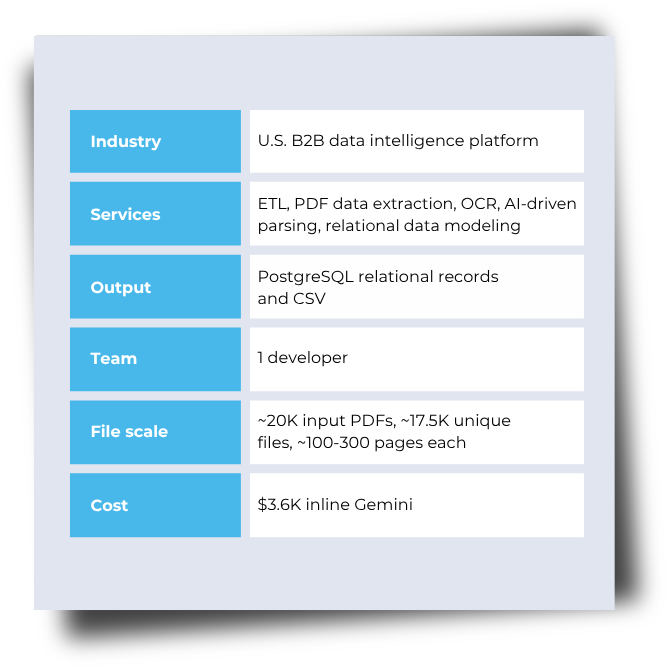
A B2B data intelligence platform needed to extract structured data from business disclosure PDFs containing text, tables, forms, and scanned pages.
The ETL system had to capture two entity types:
- Operating entities and locations: 40+ fields covering identity, status, dates, addresses, contacts, location metrics, and administrative references.
- Provider or parent organizations: 25+ fields covering company details, classification, commercial data, contacts, and document metadata.
The data had to be accurate enough for entity matching, database enrichment, analysis, and CSV delivery. An incorrect address could create a duplicate or prevent a match.
Why this was hard
Mixed PDF types
Although every source file was a PDF, the collection combined digital, scanned, and hybrid documents. Pages could include selectable text, low-resolution scans, images, forms, tables, graphics, and different orientations. A single extraction method could not reliably handle every page while preserving the content needed later.
Complex layouts
Structure varied between files and across sections of the same document. Headings moved, labels changed, table columns shifted, and some tables had incomplete boundaries, overlapping text, or embedded graphics. Layout-dependent rules could work on one file and fail on the next, while OCR often lost row and column relationships.
Dispersed data
Relevant data could be spread across roughly 100 pages within a document exceeding 300 pages. Provider details often appeared near the beginning, while operating entities, locations, addresses, and status information appeared much later. The pipeline had to find every relevant section without processing all pages identically.
Entity context mapping
Many fields looked similar across the two entity types: names, addresses, contacts, dates, and statuses. Their meaning depended on the surrounding section and business role. A correctly read value could still become wrong data if it was linked to the wrong entity or address category.
Accuracy
Extracted records were intended for entity matching, enrichment, and analysis, so plausible errors were risky. A wrong street, city, or ZIP could create duplicate entities or block a match. Missing one of several addresses could leave a record incomplete even when the remaining fields looked correct.
Processing constraints
The system had to process about 20,000 PDFs within a few days, using limited hardware and a $6,000 budget ceiling. Running OCR or AI across every page would increase processing time and cost. The workload required selective processing while maintaining consistent output across thousands of documents.
A staged pipeline for mixed PDF content
We separated the workflow into stages with different responsibilities. Deterministic components handled file registration, text extraction, sanitization, page storage, and signal detection. Gemini was used for the steps that required context: classifying page content and building structured entity records from varying layouts.
Design principle: Use rules to narrow the workload before sending selected content to AI.
1. Register documents
Source PDFs are stored in GCS. Filename, upload date, and document ID are registered in PostgreSQL.
2. Extract page text
MuPDF handles text-native content. Tesseract processes scanned pages, with Redis coordinating OCR tasks.
3. Normalize and store
Text is cleaned, split into individual pages, and stored for page-level access in PostgreSQL.
4. Detect target signals
Rules identify pages and ranges containing relevant addresses and business sections.
5. Run bounded AI tasks
Separate Gemini prompts classify page content and extract data for each entity type.
6. Load the responses
Gemini responses were parsed into structured PostgreSQL tables. A database view combined the final records for query and CSV export.
AI used for three tasks
The pipeline did not send the same prompt for every page. Page selection determined which content reached each classification or extraction mode.
300+
page PDF
~100
relevant pages
First 5 pages
Organization-level dataSignal pages
Keywords + patternsMODE 1
Provider / parent
extraction
First 5
pages
MODE 2
Address-type
classification
Signal
pages
MODE 3
Operating-entity
extraction
Classified
ranges
2 schemas
40+
fields
25+
fields
Two entity models, two separate schemas
The models shared field types: names, addresses, and contacts, but represented different business objects.
Their schemas stayed separate throughout extraction and storage.
Synthetic example
Provider
Atlas Business Systems, Inc.
550 Market Street, Denver, CO 80202
Active operating entities
Riverton Operations LLC
214 Cedar Avenue, Raleigh, NC 27601
Gemini task
Classify
+
Extract
Page type
Entity type
Field mapping
Provider / parent record
company_name: "Atlas Business Systems, Inc."
entity_type: "Corporation"
business_address: "550 Market Street..."
state: "CO"
Operating entity record
entity_name: "Riverton Operations LLC"
status: "Operating"
business_address: "214 Cedar Avenue..."
opening_date: "2022-04-18"
store_number: "NC-014"
Rerun only the affected scope
Recovery controls isolated failed responses, incomplete records, and individual pages without restarting the full document or corpus.
Failed or partial response
--retry
Read failed and partial JSON logs, then process those entity responses again.
Missing required fields
--retry --empty-fields
Target records where a required value, such as an address, was not returned.
Individual page
--id doc_10023_page_237
Reprocess one page by ID without restarting the complete document.
What the pipeline produced
The corpus became page-addressable text and queryable relational records, with OCR and AI reserved for the content that required them.
~17,500
Unique documents
in the processing corpus
2
Relational entity
schemas
40+ / 25+
Fields by entity
type
PostgreSQL
+ CSV
Queryable and
exportable output
Project performance
Processing time
2-3 hours
For a 300+ pages PDF with ~100 pages selected for processing
Extraction accuracy
95%+
Achieved through text preprocessing and targeted AI extraction
Gemini model cost
Inline processing Used in the project
$3,600
Batch Calculated alternative
~$1,800
Project tech stack
Document processing
MuPDF (go-fitz) Tesseract
AI
Gemini
Coordination & storage
Redis PostgreSQL Google Cloud Storage
Runtime & logging
Go Python Docker Zap
Related project
PDF data extraction with AI for a leading B2B data intelligence platform
Challenge:
Extract data from 18K scanned PDFs in 30 formats.
Solution:
Trained Gemini Vertex AI model for pattern-based extraction. Automated data load and processing with Airflow Dags on Python.
Result:
Text files with business contact data.