
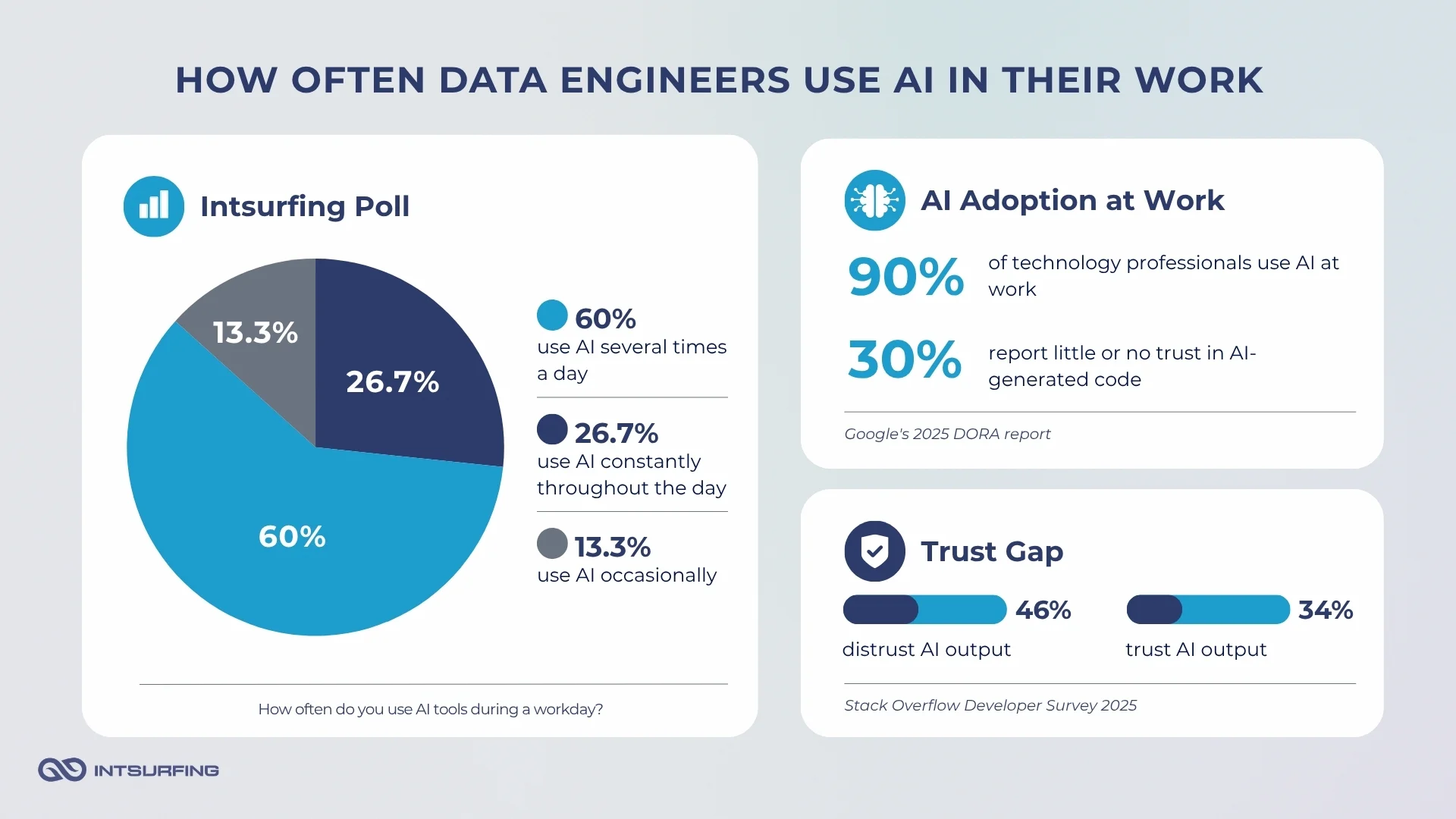
Google’s 2025 DORA report says 90% of surveyed technology professionals use AI at work. But high adoption does not mean direct trust.
Stack Overflow’s 2025 Developer Survey found that more developers distrust AI tool accuracy than trust it: 46% distrust the output, while 34% trust it. DORA shows a similar trust gap: 30% of respondents report little or no trust in AI-generated code, even as most say AI has improved their productivity.
We saw the same pattern in our internal poll of Intsurfing data engineers. Most respondents use AI several times a day or constantly. Still, everyone validates the output manually.
This article combines broader industry research with our internal engineering poll to look at how data engineers use AI today, where it helps, where it fails, and what engineers still need to own before AI-generated work reaches production.
What AI Tools Do Data Engineers Use Most Often?
Tool choice in our poll split into two questions: which tools engineers use at all, and which one they treat as their primary or favorite tool for data engineering work.
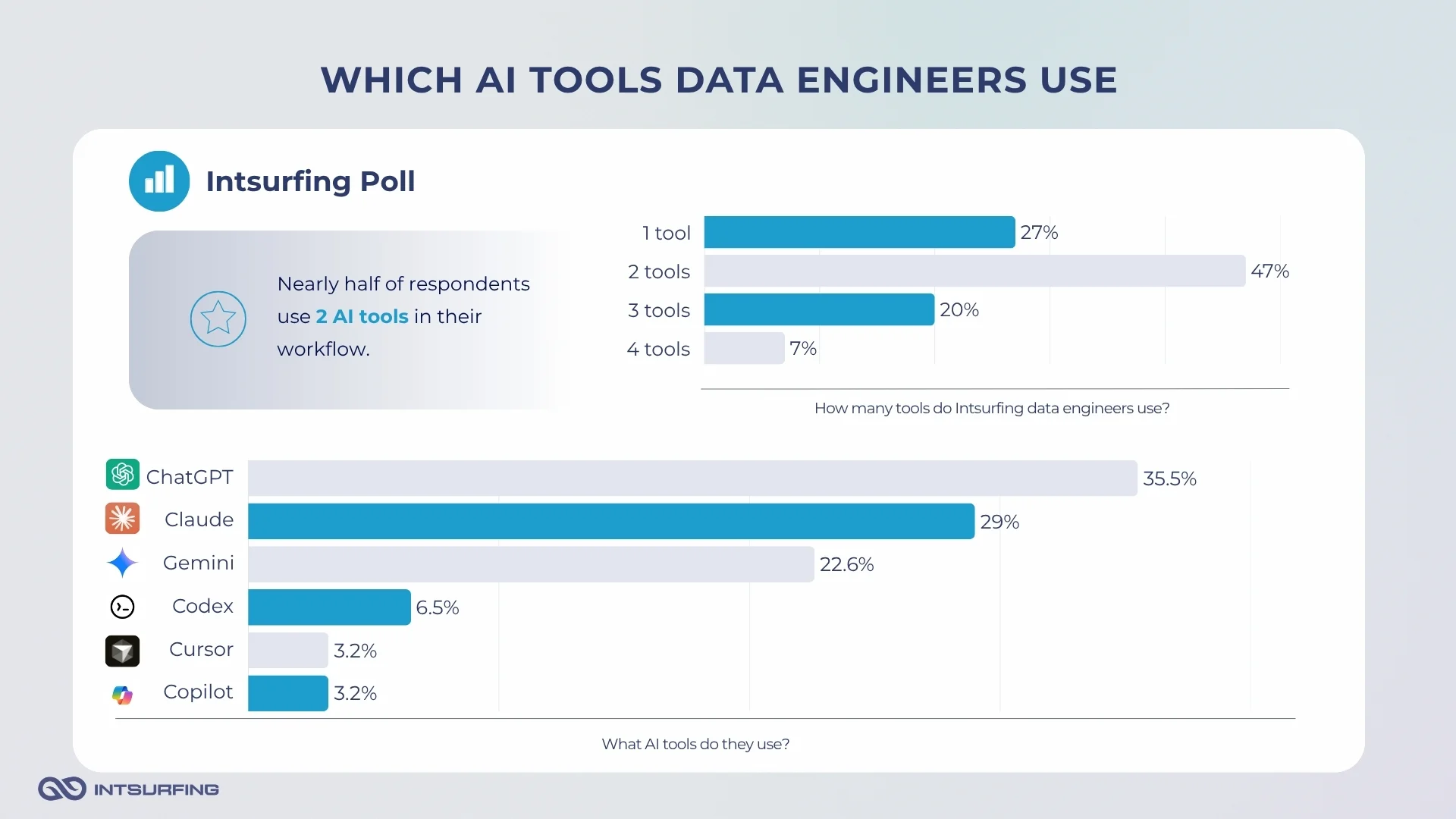
ChatGPT had the broadest reach: 75% of respondents said they use it. Claude followed at 63%, then Gemini at 44%. GitHub Copilot appeared in 13% of responses, while 19% selected “Other,” mentioning Cursor, Codex, and JetBrains AI Assistants.
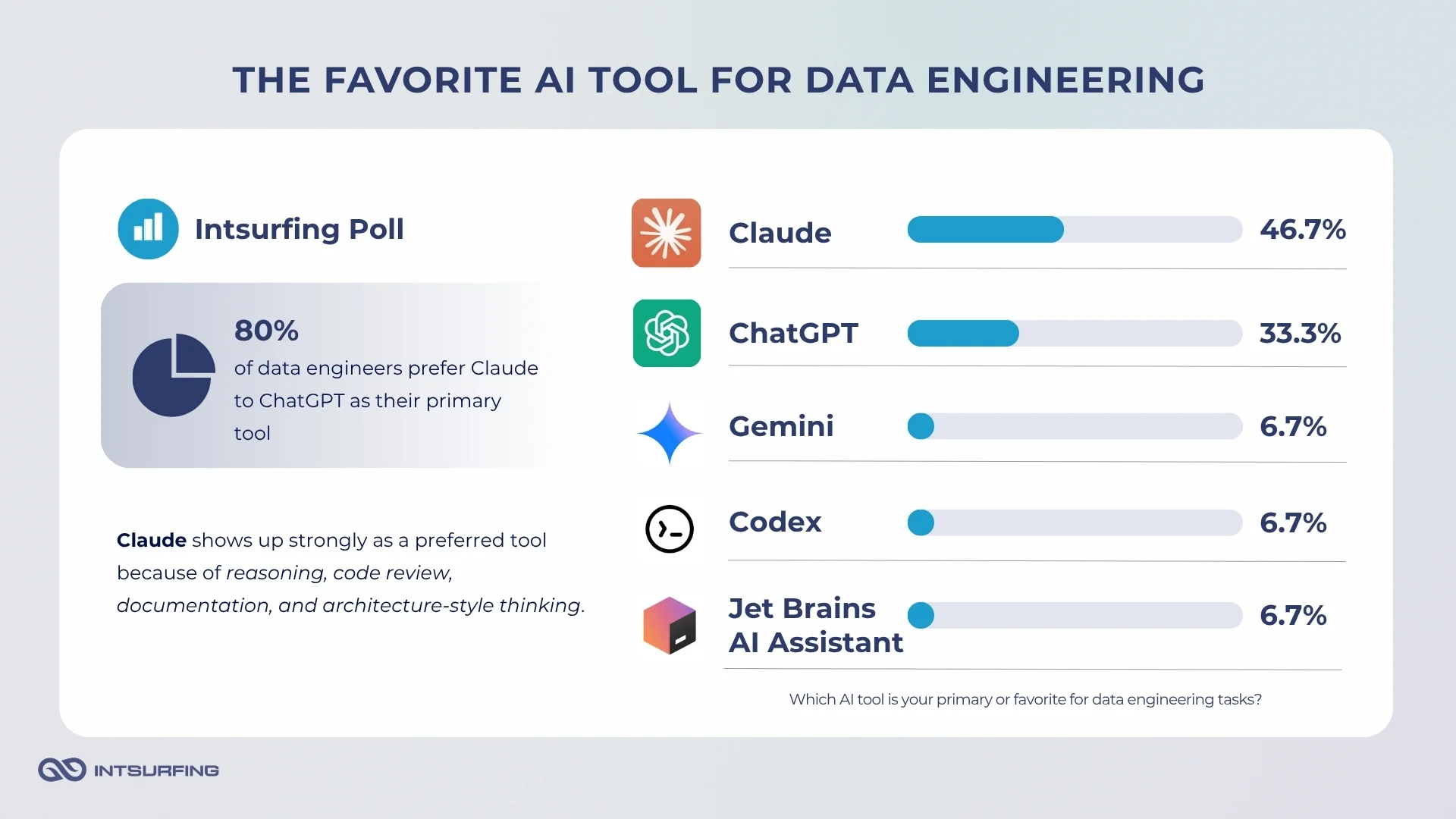
But when we asked for the primary or favorite tool, the picture changed. Claude led with 47%. ChatGPT came next at 33%. Gemini, Codex from ChatGPT, and JetBrains AI Assistants each appeared as a primary choice for 7% of respondents.
The broader developer market looks a bit different. In The Pragmatic Engineer’s 2025 tech stack survey, 85% of respondents mentioned at least one AI tool. GitHub Copilot was the most-mentioned tool, with roughly every second respondent saying they use it. The same survey also noted that Claude gained a lot of ground compared with ChatGPT, while Cursor was rising among AI-powered IDEs.
What Data Engineers Use AI for Today
dbt Labs’ 2026 State of Analytics Engineering report found that 72% of respondents prioritize AI-assisted coding in their development process. But only 24% prioritize AI-assisted pipeline management, including testing, observability, and quality controls.
This means that engineers are mostly using it around the parts of work that start with a draft: code, queries, scripts, docs, explanations, and first-pass ideas.
Our internal poll points in the same direction. Check the image to see how the Intsurfing team uses AI for data engineering tasks.
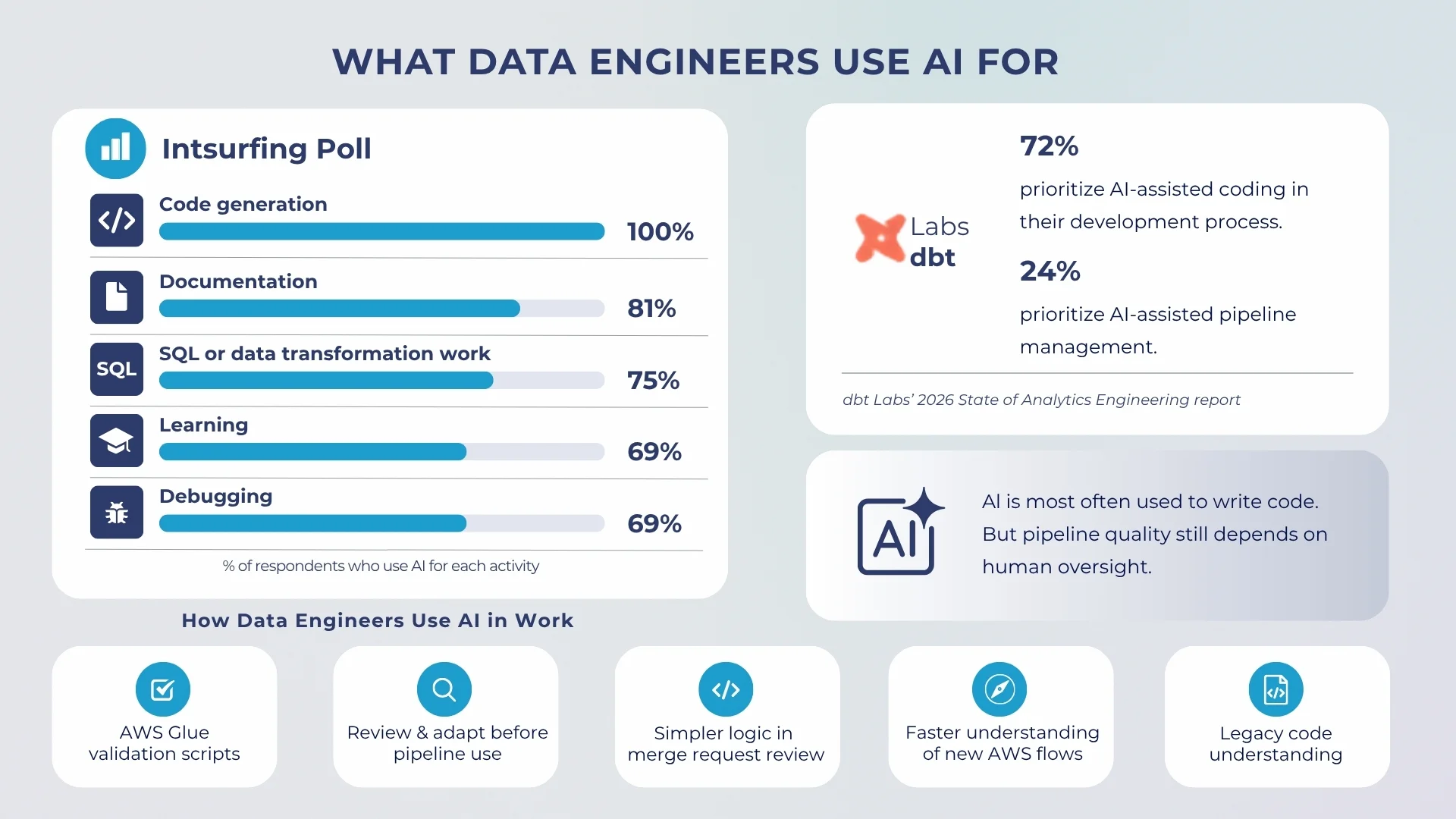
From a more practical standpoint, the team provided the following AI use examples in daily work. One developer generated validation scripts for AWS Glue jobs, then reviewed and adapted them before adding them to the pipeline. Another used AI during a merge request review and found a simpler version of the same logic. Several respondents used it as a quick way to enter unfamiliar territory: an AWS flow they had not touched before, a legacy script with little context, or a library they needed to understand before changing the code.
The Work Starts Faster
Code generation leads because data engineering has many tasks where a good first version saves time: helper scripts, configs, query drafts, validation checks, small refactoring, shell commands, and pipeline setup.
Some responses were very practical. AI was not used to rethink the whole pipeline. It was used to get through smaller engineering tasks faster.
Yevhenii Chychykalo, a middle .NET and Python developer, points out:
“I use AI to quickly explore solutions, get summaries, and find relevant documentation. This allows me to focus less on manual searching and more on implementing and refining solutions.”
That does not mean engineers stop thinking through the problem. Mykhaylo Sukhikh, a Python engineer, describes that AI made his workflow more structured.
“I focus more on breaking problems into smaller parts, validating assumptions early, and iterating quickly instead of trying to find a perfect solution from the start.”
The Problem-Solving Process Has Changed
The more useful finding of our poll was not that engineers use AI more often. That part is expected now.
The real change is in the shape of the work.
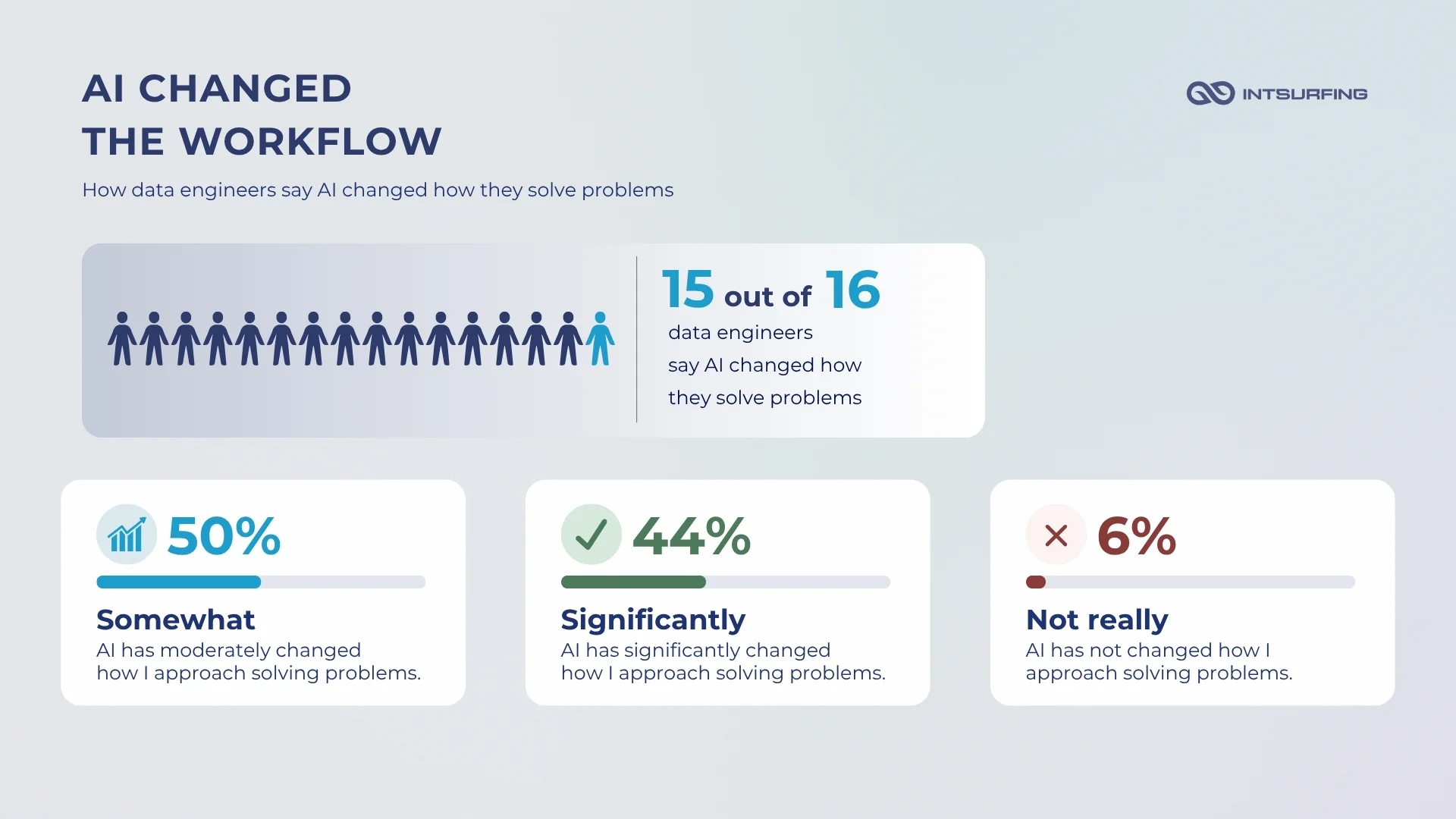
What we found common in most responses is that developers spend less time looking for a starting point and more time checking whether the answer actually fits the task.
Alex Hytsiv, Intsurfing’s Scala data engineer, described it as a move from research to review:
“My problem-solving style has shifted from researcher to editor. I used to dig through docs and forums just to understand an issue before I could even tackle it. Now, I let AI do the heavy lifting, like sourcing information and drafting solutions. My main job today is verification.”
Iryna Oliinyk, a team lead at Intsurfing, pointed to the same change from a time-cost perspective:
“I’ve passed off all the grunt work to AI, so now I can spend my time solving more engaging and complex challenges.”
Oleg Mygryn, a Scala engineer with more than 10 years of experience, mentioned another practical shift: AI makes it easier to move outside familiar tools.
“Speed of delivery changed. I’m now more open to other programming languages.”
Elina Sitailo, the company’s CEO, summed up the limit well:
“It’s superfast to detect several approaches or decisions, but it still requires a clear understanding of the business task and goal.”
So, engineers can get to possible approaches faster. They can move through docs, examples, boilerplate, and first drafts with less friction. But the second half of the work stays with the engineer: checking assumptions, testing outputs, understanding the business goal, and deciding what is safe to use.
AI Use Cases in Data Engineering
In most cases the Intsurfing data engineers shared in the poll, AI helped at:
- Getting to a first working version
- Finding a simpler approach
- Making sense of messy input before the final decision.
Below are the use cases that came up in our internal responses and project work.
Generating Code and Validation Scripts
Code generation was the most common AI use case in our internal poll. But the better examples were about using AI inside a controlled engineering workflow.
Mykhaylo Sukhikh used AI while working on validation Glue job scripts for the dataset:
“Developed validation Glue job scripts for the public data dataset, generating the full scripts from scratch and iteratively refining them until they met the required functionality. As a result, two Glue job scripts were successfully integrated into the pipeline.”
The important part is the loop around it: generate, review, refine, validate, and only then integrate.
That pattern shows up often in data engineering. AI can help draft the first version of a script, especially when the structure is clear. But the engineer still needs to know what “valid” means for the dataset, which checks belong in the pipeline, and what should happen when the data fails those checks.
Reviewing Code and Simplifying Logic
AI also helped with code review. Tetyana Efimenko, Intsurfing’s senior data engineer with 10+ years of coding experience, described a merge request where part of the code did not look right, but there was not enough time for a full manual analysis. She used AI to review the logic and look for possible issues.
“AI found a potential problem and suggested a simpler solution. The code was reduced from about 15 lines to 5 lines, making it cleaner and easier to understand.”
This is one of the more grounded use cases. AI did not replace the review. It helped create another angle on the code.
For data teams, that can be useful when reviewing transformation logic, helper functions, validation code, or pipeline changes. AI can point out redundancy, edge cases, or a cleaner way to express the same logic. The final decision still belongs to the engineer who understands the surrounding system.
Automating Pipeline Support Tasks
Some AI use cases were less about writing code and more about removing operational friction around data pipelines.
Oleh Vasylyshyn described a task that involved searching a large file location for the latest file portions by pattern, uploading them to HDFS, moving them to S3, and creating a config.json file with S3 paths for a Glue script running in Spark pipelines.
“Script was generated perfectly and worked without bugs from the very first try.”
This is a good example of where AI can be very practical: shell scripts, file movement, config generation, command-line utilities, and repeatable pipeline support tasks.
These tasks are often annoying rather than conceptually hard. They still need review because a wrong path, file pattern, or upload target can create problems downstream. But when the engineer knows exactly what the script should do, AI can save time on the first draft.
Yevhenii Chychykalo gave a similar example from a Docker-based workflow:
“Provided documentation and project context, then used AI to generate an automation script. Iteratively debugged and refined the solution. Achieved a reliable automated pipeline that reduced manual work and minimized errors.”
AI was useful because the engineer gave it project context and then kept refining the result. The value came from the combination of automation and review.
Understanding Legacy Code and Unfamiliar Systems
Not every AI use case ends with generated code. Sometimes the value is getting oriented faster.
Nazarii Huliak, Scala developer, used AI to analyze a long legacy script and decide how to approach the main task:
“Results were acceptable, but they could be better; AI made small mistakes. I asked again and received a better answer.”
Olena Falieieva, Scala engineer, used AI while working with AWS cross-account flow. The result was not a finished artifact, but a clearer understanding of how the flow should work.
That is a common pattern in data engineering. Teams often work with old scripts, undocumented jobs, cloud services they do not touch every day, and pipelines built by someone else. AI can help explain the moving parts, summarize possible approaches, and reduce the time needed to get oriented.
But this use case has a limit. If the model lacks context, it can explain the generic version of the system rather than the real one in front of you. That is why engineers still need to compare the explanation against the actual code, infrastructure, logs, and data behavior.
Normalizing Messy Multi-Source Data
One of the strongest examples from the poll came from Alex Hytsiv. The task involved a messy auto-dealer dataset aggregated from more than 50 sources. One field contained around 100,000 unique, unstandardized job titles that needed to be normalized into a few hundred standard categories.
The easy mistake would have been to send the whole file to an LLM and hope it produced clean categories. Alex first estimated the token load and cost. A rough calculation showed that pushing a 100 MB file directly through a large model could become expensive and run into context limits.So the team used AI differently.
AI helped design the pipeline. Then local regex and fuzzy-matching logic handled common job-title patterns before the remaining records went to a smaller model through batch processing.
The result was much better economics. Local preprocessing handled about half of the dataset. The number of records requiring AI normalization dropped from 100,000 to about 50,000. The estimated inference cost fell from a possible $500+ to roughly $1.
The model was not used as a black box. It was part of a pipeline with preprocessing, cost control, batch routing, and human decisions about where LLM use made sense.
Extracting Structured Data from PDFs
AI can also help where classic parsing approaches break down.
In a recent Intsurfing PDF parsing project, the team needed to process documents at scale. The goal was to extract structured entities from unstructured PDF content and store the output in PostgreSQL for querying and analysis.
The dataset included digital PDFs, scanned documents, hybrid PDFs, table-heavy sections, and form-like content. Some scans had low resolution or noisy text. Some documents had no stable page structure. Tables could have weak cell boundaries, overlapping text, or missing rows after OCR.
A pure OCR or regex-based approach was too fragile for this kind of input. Tesseract struggled with scan quality and tabular data. Regular expressions broke when document structure changed.
The final system used a layered extraction pipeline. MuPDF handled text-native PDFs. Tesseract worked as a fallback for image-based files. Redis helped coordinate OCR tasks. PostgreSQL stored extracted text and structured results. Gemini was used where rule-based methods were not enough: address type classification, company name extraction from the first pages, and data extraction from text-rich pages with detected address signals.
The project processed around 17,500 unique documents after deduplication. The estimated Gemini cost was about $3,600 in inline prompt mode, or about $1,800 with batch processing. Accuracy on tested sample FDD documents was estimated above 95% for extracting the right data from preprocessed text segments.
In this case, AI was not used to replace the whole parsing pipeline. It handled the part that needed language understanding after the system had already extracted, cleaned, split, filtered, and routed the text.
Where Does AI Fail in Data Engineering?
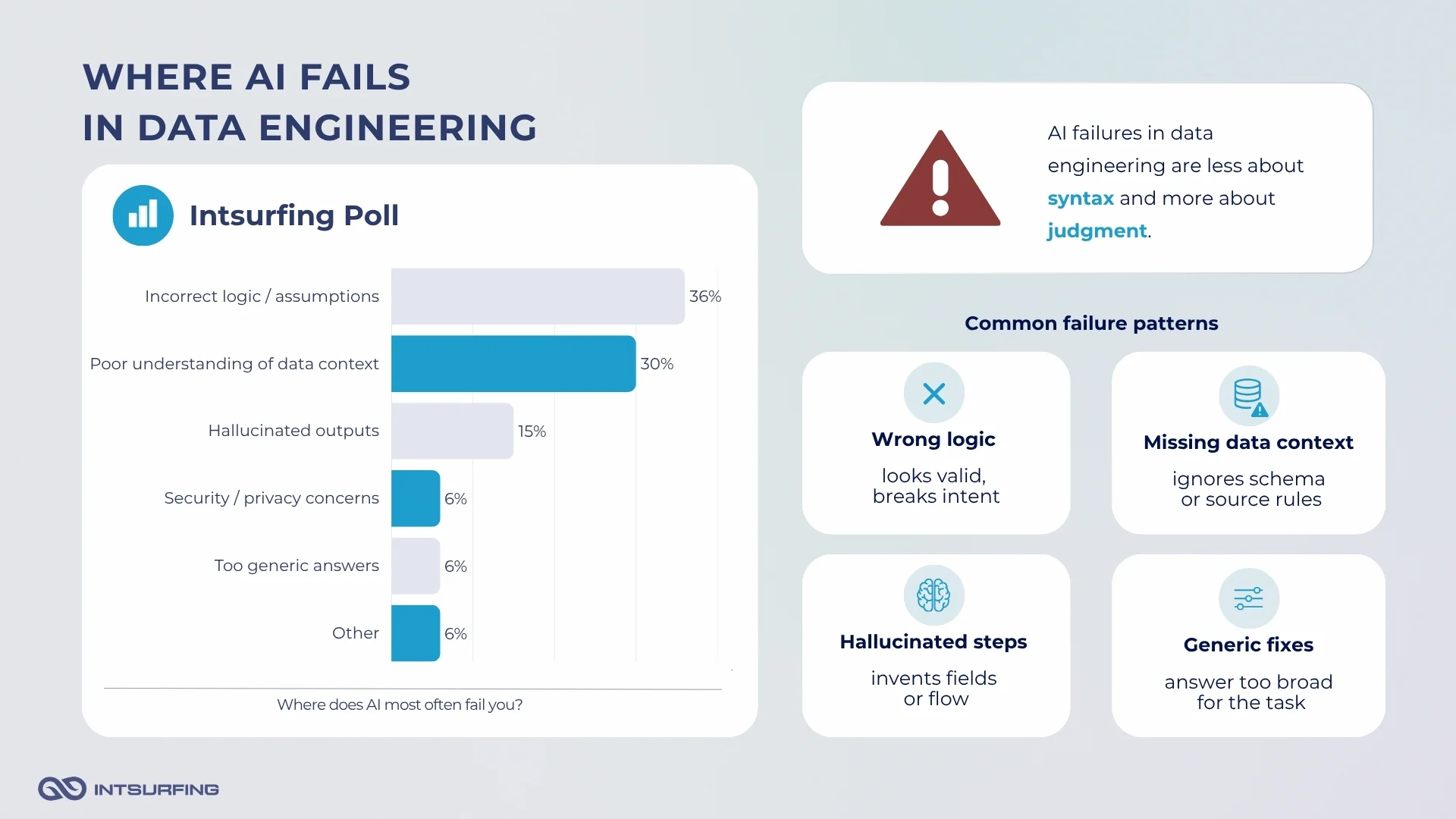
Our poll shows that AI failures in data engineering are less about syntax and more about judgment.
75% of respondents said AI most often fails with incorrect logic or assumptions. 63% pointed to poor understanding of data context. 31% mentioned hallucinated outputs. Security and privacy concerns, too-generic answers, and other issues each appeared in 13% of responses.
These categories overlap. A wrong SQL query may look like a logic problem, but the root cause is often context: the model does not understand the schema, source quirks, business rule, or expected output.
AI Can Produce Working Code with the Wrong Logic
The most common failure mode was that the code looked usable but did the wrong thing. Iryna Oliinyk shared an example:
“The other day, AI tried to ‘help’ by writing a SQL query that ran for a solid 30 minutes and didn’t even return the right data. Now I often add strict constraints just to keep it from being over-eager.”
That is a typical data engineering risk. A query can run. A job can finish. A table can load. But if the join logic, filter, aggregation, or date handling is wrong, the failure may not be obvious until it affects a downstream report, model, or product feature.
This is also why OWASP treats poor handling of LLM outputs as a security and reliability issue. Its 2025 guidance on Improper Output Handling defines the risk as insufficient validation, sanitization, and handling of LLM-generated outputs before they are passed downstream. In data engineering, “downstream” can mean another pipeline step, a warehouse table, an API, or a customer-facing product.
AI Struggles When the Missing Piece is Context
Several stories from the poll were about AI missing the actual constraint.
Tetyana Efimenko described a task where requests from a Docker container were returning a “Forbidden” response. AI kept steering the solution toward Playwright, even though she wanted to avoid adding that extra tool.
“After some investigation, I found that the issue could be resolved by adding a specific statistics cookie to the request. That solved the problem without needing extra tools.”
The model was not completely useless. It helped explore the issue. But it locked onto a heavier workaround because it did not understand enough about the source behavior.
That is common in data work. External sources, vendor feeds, PDFs, legacy scripts, and cloud jobs often fail for small, local reasons: a cookie, a header, a malformed file, a missing text layer, an unexpected null, a shifted table, a changed field name.
AI can suggest a general fix. The engineer still has to find the real one.
Elina Sitailo put the limitation directly:
“Modern AI fails when you don’t provide enough context or don’t describe the task clearly.”
In production data engineering, full context is rarely available in one prompt. It lives across schemas, logs, source behavior, business rules, old decisions, edge cases, and downstream dependencies.
Hallucinations Become Dangerous When the Output Sounds Confident
31% of respondents selected hallucinated outputs as a failure mode. Oleksandr Sitailo mentioned that AI gave outdated setup instructions for an application. That kind of failure wastes time, but it is usually easy to catch once the setup breaks.
The larger risk is when hallucinated output sounds reasonable.
Alex Hytsiv shared a personal example with a 65-page legal contract. The task was not data engineering, but the failure pattern is relevant: the model struggled with a large document, lost context, invented clauses, and misread actual statements.
“It was incredibly dangerous to trust its initial summary.”
He eventually made it more useful by splitting the document into smaller chunks, running several sessions in parallel, and cross-checking the answers. But the important point is that the first output looked like a summary and still could not be trusted.
NIST’s Generative AI Profile treats confabulation, information integrity, and data privacy as risk areas for generative AI systems. It also recommends empirical testing, documenting limits, using human domain knowledge, and evaluating systems in real-world scenarios rather than assuming a model will generalize safely from narrow tests.
For data engineering, this matters when AI works with long documents, schema descriptions, data samples, source documentation, logs, or generated summaries. The output may be fluent. That does not mean it is grounded.
Security Limits Change What Engineers Can Safely Send to AI
Security and privacy concerns appeared in 13% of responses, but the real number may be higher in practice because many engineers already avoid sending sensitive material by default.
Oleh Vasylyshyn described:
“It can’t be used with real data or security keys. Before submitting something, you need to check whether it can actually be submitted and whether it contains anything sensitive.”
This becomes important when AI is used around production systems. Logs, database samples, API responses, credentials, customer records, configuration files, and internal documentation may contain data that should not leave the controlled environment.
IBM’s 2025 Cost of a Data Breach research found that one in five organizations reported a breach due to shadow AI, and only 37% had policies to manage or detect it. Organizations with high levels of shadow AI saw $670,000 higher average breach costs than those with low or no shadow AI.
How Do Data Engineers Validate AI-Generated Output?
All respondents said they manually review AI-generated output before using it. Half write test queries. 44% compare AI output with known results. 31% said they do not rely on AI output directly, and 25% add validation checks into pipelines.
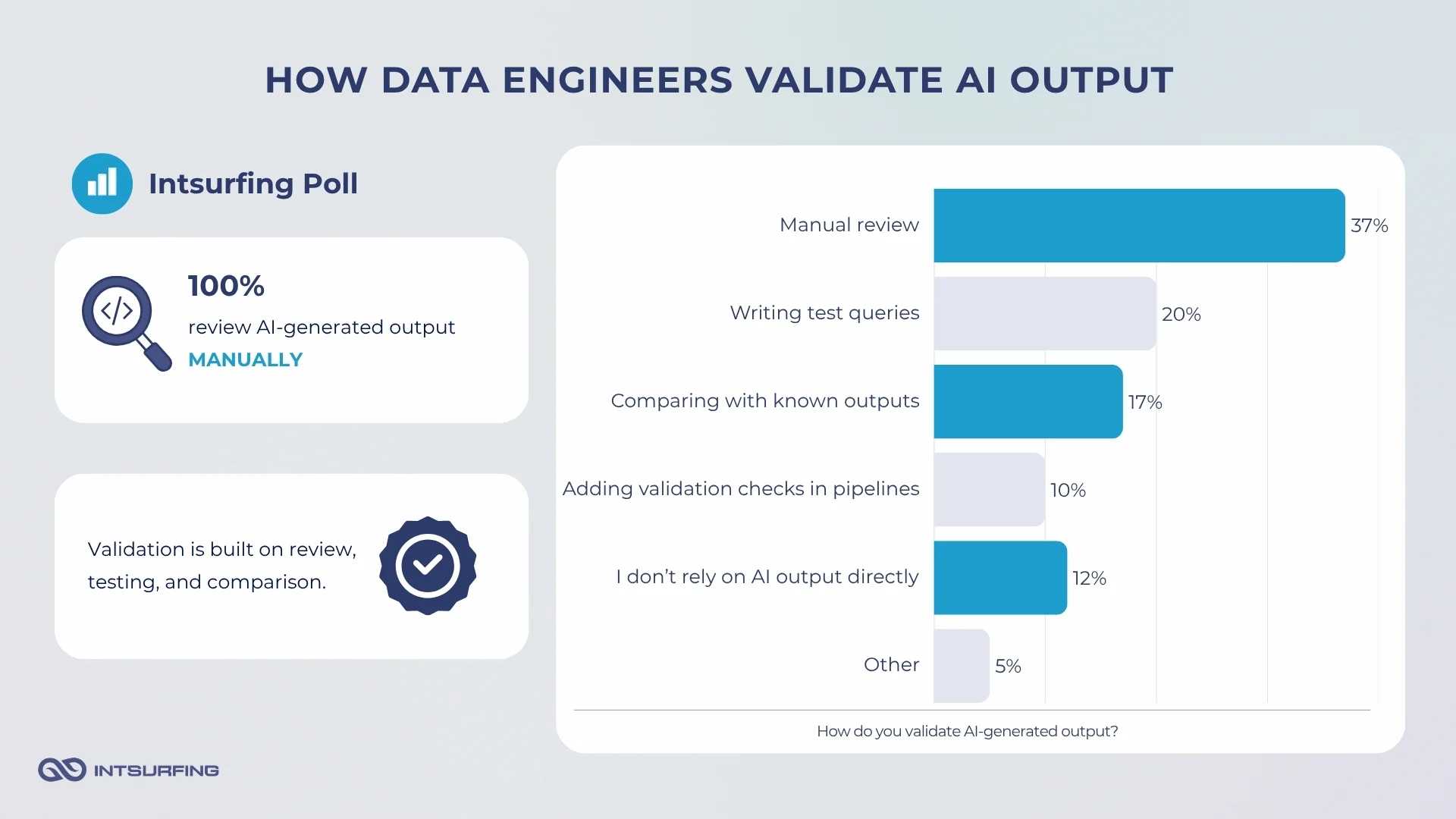
Intsurfing developers describe debugging with AI as an iterative loop: generate a possible fix, test it, add more context, and try again. When the issue is more complex, they provide traces, describe the expected behavior, and ask for minimal code or logic changes rather than a full rewrite.
What Data Engineers Still Need to Own When Using AI
AI can speed up parts of data engineering, but it does not take responsibility for the result.
That is where our poll responses were very consistent. Engineers mentioned critical thinking, business context, communication, final decisions, testing, monitoring, and responsibility as things AI still cannot replace.
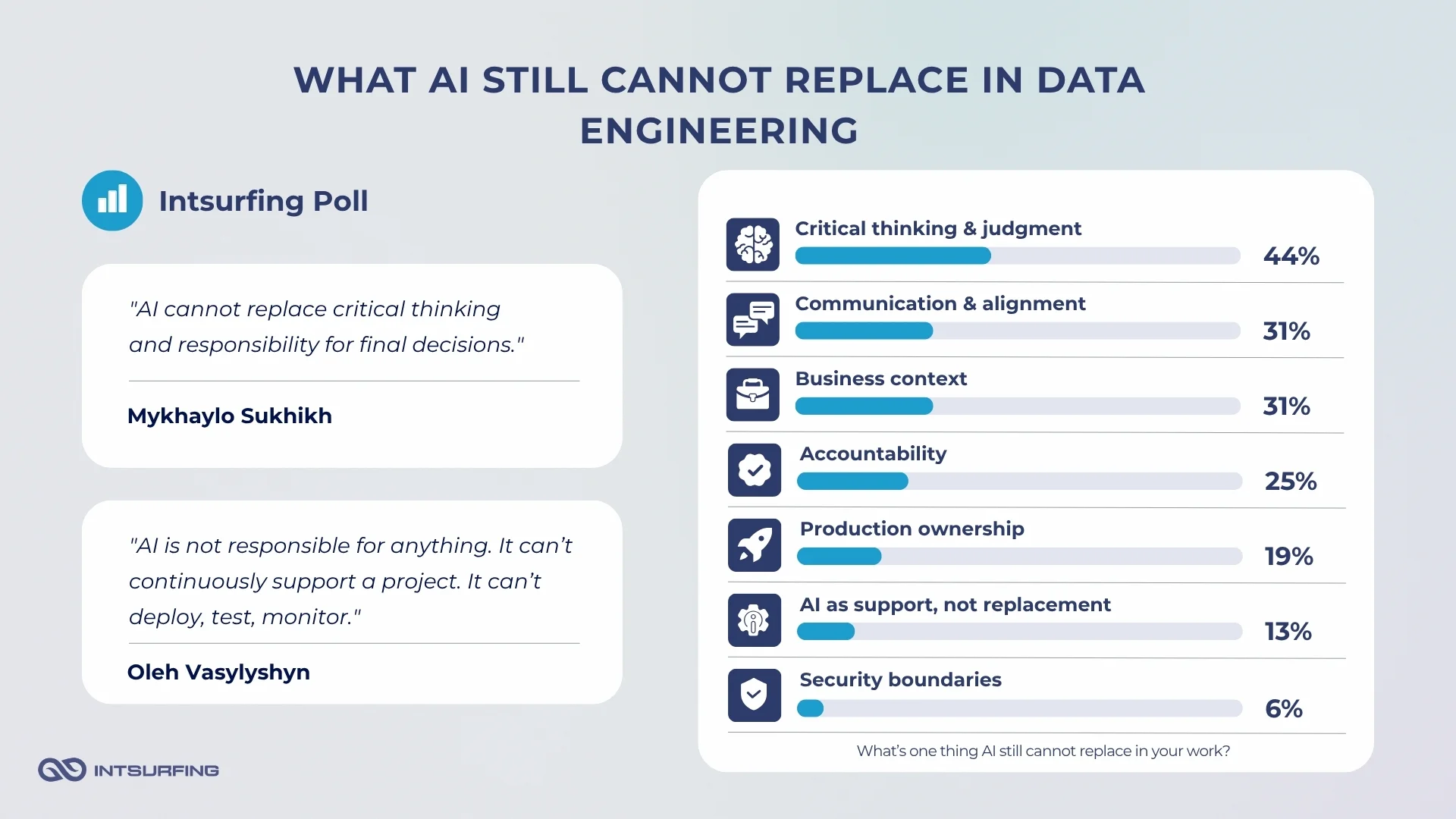
DORA’s 2025 report describes AI as an amplifier of the engineering system around it. If the team has strong review, testing, and delivery practices, AI can help. If those practices are weak, AI can expose or magnify the weakness.
So, engineers still need to own:
- Data meaning: what fields represent, how nulls behave, which values are trusted, and what “correct” means for the business.
- Pipeline logic: joins, filters, deduplication, transformations, source priority, and update rules.
- Validation: test queries, sample checks, known-output comparison, anomaly detection, and pipeline-level quality checks.
- Security boundaries: what data, logs, credentials, and internal context can safely be shared with an AI tool.
- Production ownership: deployment, monitoring, incident handling, rollback logic, and long-term maintenance.
A 2026 systematic review of empirical research on AI-generated code also points to the same issue: output quality depends not only on the model, but on prompt clarity, task definition, developer expertise, and how the generated code is reviewed and integrated into the workflow.
Conclusion
AI is already useful in data engineering, but the strongest use cases are still bounded and reviewable: code drafts, SQL help, documentation, debugging, research, and first-pass thinking. Our internal poll shows the same pattern as broader industry research. Engineers use AI often, but they do not treat its output as ready for production.
The real line is ownership. AI can suggest code, summarize a document, explain a script, or point to a possible fix. But engineers still need to understand the data, validate the logic, protect sensitive context, monitor the pipeline, and take responsibility for the final result. In data engineering, that distinction matters because bad output does not always fail visibly. Sometimes it runs, loads, and looks normal until someone checks the data behind it.