
This article focuses on the technical and operational issues that most often break web data collection in projects.
To understand what actually goes wrong, we analyzed 82 discussion threads (questions, issues, and conversations) from Stack Overflow, Reddit, GitHub Issues, Hacker News, niche and regional platforms.
TL;DR
- Anti-bot protection (403, 1020, Access Denied) appears in 20 out of 82 cases. In most cases, this comes down to missing cookies, JavaScript challenges, or outright denial of access.
- 429 “Too Many Requests” appears in 12 cases. Some systems provide a Retry-After header, but many pipelines ignore it and fail.
- In 8 cases, teams report growing memory usage, unclosed browser contexts, and long-running jobs that eventually break.
- Timeouts in headless browsers is another problem. 6 cases highlight that everything works locally, but fails in cloud environments, often with the default 30-second timeout.
- Architecture and operational costs show up in 5 cases. These include proxy management, repeated data downloads, and poor tool choices.
In total, the top five problems account for ~62% of all cases. Which means that most of the pain is predictable.
How the Data Was Collected and Classified
We focused on discussions where developers described real, reproducible failures. Each was then treated as a single unit of analysis and assigned to one primary issue, even if multiple problems were mentioned.
The classification and ranking follow this logic:
- The unit of analysis is a thread, not individual comments.
- Frequency reflects how many threads fall into each issue category.
- Rankings are based on this frequency.
- Severity (1–5) estimates impact on delivery timelines and project outcomes.
- Ease of mitigation (1–5) shows how difficult it is to address the issue in practice.
Statistics on Data Collection Challenges
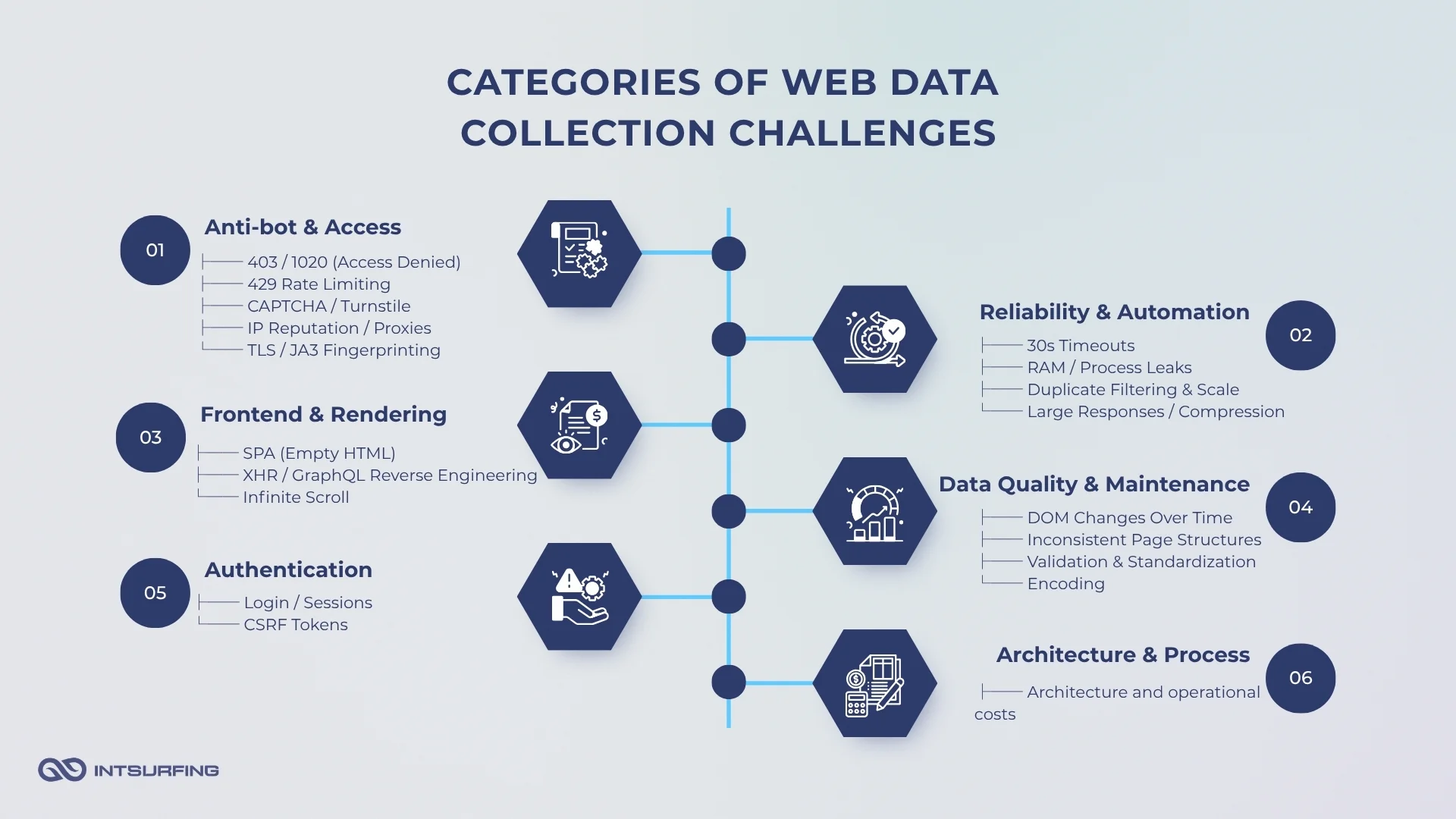
The image above shows how issues distribute across categories. Most problems cluster around access and reliability, with anti-bot protection and rate limiting forming the largest share. This confirms that teams struggle more with getting and maintaining access to data than with extracting it.
Other categories — rendering, authentication, and data quality — appear less frequently but still play a critical role in projects. These issues tend to surface later, once access is established, and often introduce instability or data errors.
The table below ranks problems based on how often they appear in our research.
| Rank | Issue | Threads | Share (%) | Severity (1–5) | Ease of Mitigation (1–5) |
|---|---|---|---|---|---|
| 1 | WAF/CDN blocking (403/1020) | 20 | 24.4% | 5 | 2 |
| 2 | Rate limiting (429) and backoff | 12 | 14.6% | 4 | 4 |
| 3 | Resource leaks (RAM/processes) | 8 | 9.8% | 4 | 2 |
| 4 | Headless browser timeouts | 6 | 7.3% | 3 | 3 |
| 5 | Architecture and operational costs | 5 | 6.1% | 4 | 3 |
| 6 | Authentication and sessions | 4 | 4.9% | 4 | 2 |
| 7 | CSRF and hidden tokens | 4 | 4.9% | 3 | 3 |
| 8 | IP reputation and proxies | 2 | 2.4% | 5 | 2 |
| 9 | CAPTCHA and challenges | 2 | 2.4% | 5 | 1 |
| 10 | JavaScript rendering and SPA | 2 | 2.4% | 4 | 3 |
| 11 | Data quality and cleaning | 2 | 2.4% | 4 | 3 |
| 12 | DOM changes over time (maintenance) | 2 | 2.4% | 4 | 2 |
| 13 | Reverse engineering network requests (XHR/GraphQL) | 2 | 2.4% | 4 | 2 |
| 14 | URL duplication and canonicalization | 2 | 2.4% | 3 | 4 |
| 15 | Infinite scroll / Load more | 2 | 2.4% | 3 | 3 |
| 16 | Flaky browser automation | 2 | 2.4% | 3 | 3 |
| 17 | Encoding and Unicode issues | 2 | 2.4% | 2 | 4 |
| 18 | TLS/JA3/HTTP2 fingerprinting | 1 | 1.2% | 4 | 3 |
| 19 | Inconsistent page structure | 1 | 1.2% | 4 | 2 |
| 20 | Large responses and compression | 1 | 1.2% | 3 | 3 |
But what does it all mean? Let’s take a look.
Access is the real bottleneck
Across the dataset, access-related issues dominate. 403 (Access Denied) and 429 (Too Many Requests) appear more often than any parsing or data-related problems. In practical terms, teams don’t fail at extracting data. They fail at reaching it.
In one case, a developer hits a Cloudflare-protected endpoint and receives:
“Error 1020: Access denied… Please enable cookies.” (https://stackoverflow.com/questions/67444887/web-scraping-access-denied-cloudflare-to-restrict-access)
The request itself is valid. The server understands it. But it refuses to serve data.
The reason is not in the URL or parsing logic. It’s in how the request looks at the network level.
Websites evaluate:
- presence of cookies
- JavaScript execution
- request headers and their order
- TLS / HTTP2 fingerprint
- IP reputation
Even when headers and cookies are copied, the result can still differ. As one GitHub issue highlights:
“Identical requests sent by Scrapy vs Requests return different status codes.” (https://github.com/scrapy/scrapy/issues/4951)
This is where many teams get stuck. They try to “fix parsing” while the real issue is access.
Rate limiting reinforces the same pattern.
A developer scraping ~60 pages reports:
“It returns 429 errors when I scrape pages consecutively.” (https://www.reddit.com/r/webscraping/comments/1b4c56x/question_on_too_many_requests_error_429/)
The server is telling you to slow down. But many pipelines ignore it, retry aggressively, and get blocked entirely.
And this changes how systems should be designed:
- request rate becomes a control variable
- sessions and cookies become mandatory
- environment (local vs cloud) affects outcomes
- retries must follow server signals, not override them
This is why access issues dominate the dataset. Because before you solve extraction, you have to be allowed to see the data first.
Modern websites hide data by design
Even when access works, the data may be not where you expect it.
A common pattern across discussions: the page looks complete in the browser, but the HTML response is almost empty. Developers parse the page and get nothing — no errors, just missing data.
As one Stack Overflow case puts it:
“The website is populating the element using JavaScript… requests cannot run JavaScript.” (https://stackoverflow.com/questions/70974581/beautifulsoup-is-missing-content)
Instead of embedding data directly in HTML, sites load it dynamically:
- via XHR / fetch requests
- through GraphQL endpoints
- inside JavaScript-rendered components (React, Vue, Angular)
- or injected into the DOM after page load
This creates a gap between:
- what you see in DevTools (rendered DOM)
- and what your code receives (initial HTML)
Another recurring observation from discussions:
“Inspect Element shows the data, but View Source doesn’t.”
This difference alone explains a large share of failed scraping attempts.
So, here is the implication of this:
You’re not scraping HTML. You’re dealing with a frontend application.
Developers who succeed in these cases almost always follow this path:
- open DevTools
- go to Network → XHR / Fetch
- trigger the action (scroll, click “Load more”)
- find the request that returns structured data
In many cases, the actual data is returned as JSON — clean, structured, and much easier to process than HTML.
As a Reddit comment summarizes it:
“Check the Network tab first. Many sites don’t load data in HTML at all.” (https://www.reddit.com/r/webscraping/comments/1qn6gi6/having_a_hard_time_with_infinite_scroll_site/)
When teams skip this step, they overcomplicate the solution:
- switching to browser automation too early
- writing fragile selectors
- dealing with timing issues that don’t need to exist
But even when the API is found, it’s not always straightforward:
- endpoints may require tokens
- pagination can be cursor-based
- requests depend on session state
So again, the problem shifts.
Because modern websites are not documents. They are interfaces backed by data pipelines.
And this is why rendering-related issues consistently appear in the dataset.
Automation introduces instability
Browser automation is often used as a fallback when simpler approaches fail.
It solves a problem — rendering and interaction. But introduces another — instability.
Across the dataset, once teams switch to Selenium, Playwright, or Puppeteer, the nature of failures changes. Instead of missing data, they start dealing with unpredictable behavior: timeouts, broken sessions, and scripts that work inconsistently.
A common example:
“TimeoutError: Navigation timeout of 30000 ms exceeded.” (https://stackoverflow.com/questions/70487251/webscraping-timeouterror-navigation-timeout-of-30000-ms-exceeded)
The script is correct. The selector exists. But the condition never becomes true.
Why?
Because automation depends on timing, and timing is unreliable.
Pages load asynchronously. Elements appear and disappear. External scripts delay rendering.
What works locally may fail in production. This pattern appears repeatedly:
“It works fine locally, but fails in the cloud.”
The difference is not in the code. It’s in the environment:
- network latency
- CPU/memory limits
- IP reputation
- different browser behavior
Another class of errors appears when the page changes mid-execution:
“Execution context was destroyed, most likely because of navigation.” (https://github.com/microsoft/playwright/issues/36851)
Or:
“StaleElementReferenceException: element is no longer attached to the DOM.” (https://stackoverflow.com/questions/77211845/selenium-python-staleelementreferenceexception-error)
In both cases, the script interacts with something that no longer exists.
This is not a bug in the tool. It’s a property of modern web apps.
The DOM is dynamic. State changes quickly. And automation runs slightly behind reality.
To handle this, developers introduce:
- explicit waits
- retries
- conditional logic
- state checks
But each layer adds complexity.
At this point, automation becomes a system that needs to be managed.
And that’s the trade-off:
Browsers make data accessible. They also make the pipeline harder to control.
Scaling breaks everything
Across the dataset, once teams move from testing to continuous runs, a new class of issues appears — not related to access or parsing, but to how the system behaves over time.
A typical case:
“Memory usage keeps increasing until the process crashes.” (https://github.com/puppeteer/puppeteer/issues/4684)
The script runs fine for a few pages. Then RAM grows. Contexts are not cleaned up. The process dies.
This shows up across Puppeteer, Playwright, Selenium.
Another pattern:
“After a few thousand requests, everything slows down or starts failing randomly.”
At this point, the problem is no longer correctness. It’s resource management.
Common causes include:
- unclosed browser instances or tabs
- accumulating sessions and cookies
- large responses kept in memory
- retry loops without limits
Even when the pipeline doesn’t crash, it degrades.
Requests become slower. Failures increase. Costs go up.
In one of our data collection projects, our data engineering team had this problem:
“We ended up re-downloading the same data because the pipeline had no proper state tracking.”
This is where architecture starts to matter.
Without:
- deduplication
- checkpointing
- controlled retries
- clear data flow
…the system becomes inefficient and hard to maintain.
Infrastructure adds another layer.
To keep pipelines running, teams introduce:
- proxies
- distributed workers
- headless browsers at scale
Each comes with cost, both financial and operational.
And small inefficiencies multiply.
What worked as a script becomes an ongoing system:
- it needs monitoring
- it needs cleanup
- it needs control over resources
This is the point where many teams underestimate the problem.
Because scaling doesn’t just increase load. It exposes everything that was fragile from the start.
Diagnosis and Mitigation: How Teams Debug Failures
Most teams try to fix scraping issues before understanding them.
They change headers, add retries, switch tools — often blindly. But in practice, most failures are predictable if you read the signals correctly.
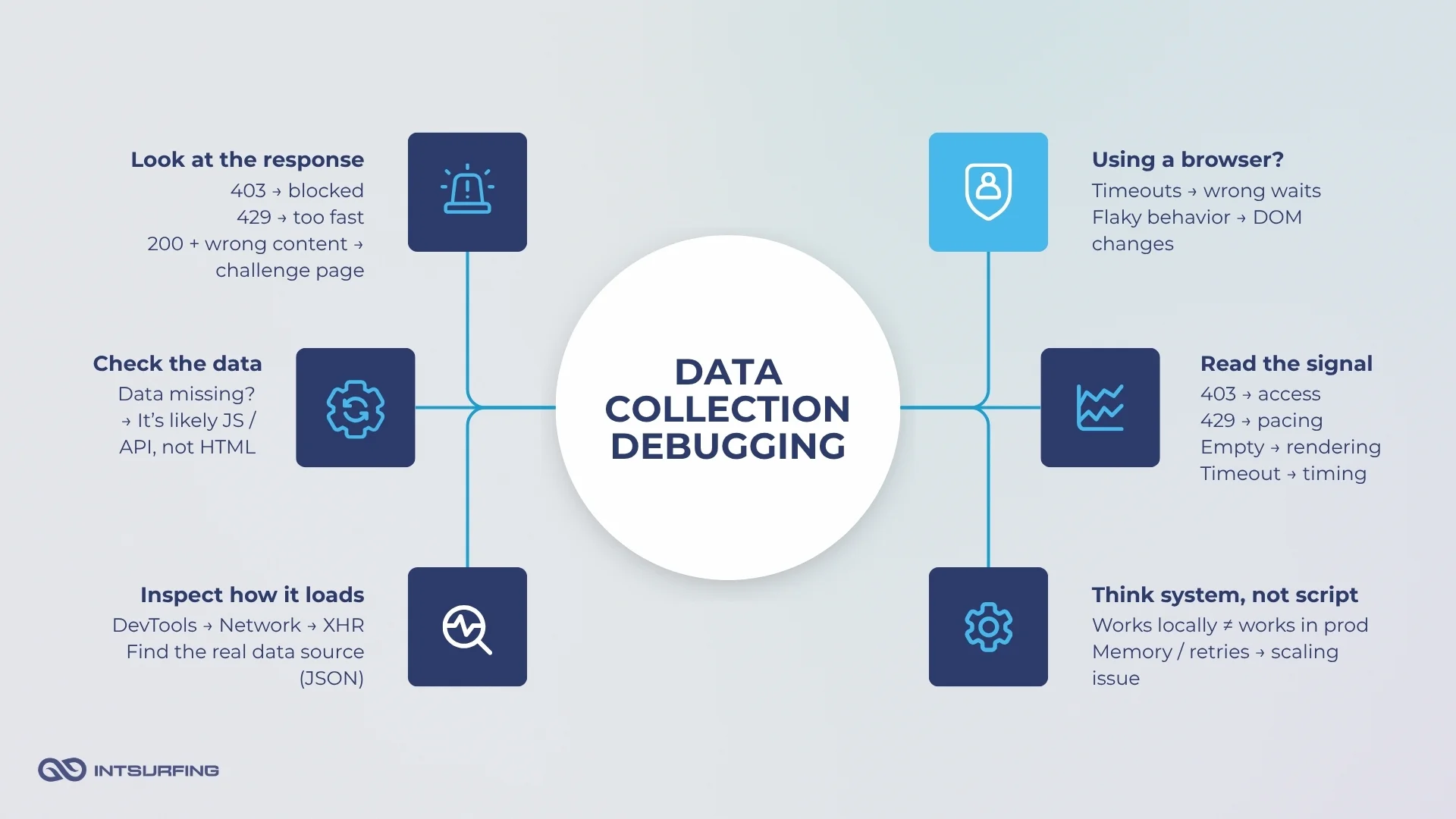
Start with the response, it tells you the problem
Different status codes point to different layers:
- 403 / 1020 → blocking
- 429 → rate limiting
- 200 but wrong content → challenge or placeholder page
A common mistake is treating all failures the same.
In one case, a developer keeps retrying requests after hitting 429:
“I keep getting 429 errors even after adding delays — what am I doing wrong?” (https://www.reddit.com/r/webscraping/comments/1b4c56x/question_on_too_many_requests_error_429/)
The issue is not the delay itself. It’s ignoring the signal.
429 is not an error to bypass. It’s feedback.
Servers often provide Retry-After, but pipelines ignore it and retry aggressively — which leads to blocking.
If the response is 200, validate the content
A 200 status code does not mean success.
Many systems return a valid response with no data.
Typical case:
“I get status 200, but the page only shows ‘Just a moment…’ instead of content.”
This happens with anti-bot pages, CAPTCHA challenges, or cookie gates.
Another example:
“BeautifulSoup returns nothing, but I can see the data in the browser.” (https://stackoverflow.com/questions/70974581/beautifulsoup-is-missing-content)
The request succeeded. The data did not.
This is why content validation is critical.
Instead of trusting status codes, pipelines should check:
- presence of expected elements
- absence of known blockers (“Access denied”, “Verify you are human”)
If data is missing, check how it loads
When HTML is empty, the issue is not parsing.
It’s rendering.
A typical observation:
“Inspect Element shows the data, but View Source doesn’t.”
This means the data is loaded dynamically.
The correct approach is consistent across discussions:
- open DevTools
- go to Network → XHR / Fetch
- trigger the action (scroll, click, filter)
- find the request returning JSON
As one developer puts it:
“Check the Network tab first. Many sites don’t load data in HTML at all.” (https://www.reddit.com/r/webscraping/comments/1qn6gi6/having_a_hard_time_with_infinite_scroll_site/)
Skipping this step leads to overengineering:
- unnecessary browser automation
- fragile selectors
- timing issues
If using a browser, control timing explicitly
Browser automation fails differently.
Instead of missing data, you get instability.
A common error:
“TimeoutError: Navigation timeout of 30000 ms exceeded.” (https://stackoverflow.com/questions/70487251/webscraping-timeouterror-navigation-timeout-of-30000-ms-exceeded)
The page exists. But the script moves too early.
Another example:
“StaleElementReferenceException: element is not attached to the DOM.” (https://stackoverflow.com/questions/77211845/selenium-python-staleelementreferenceexception-error)
This happens when:
- the DOM updates
- the element gets replaced
- the script still holds the old reference
The fix is synchronization:
- wait for specific conditions
- re-query elements
- handle dynamic state
Conclusion
Many teams approach web data collection as a parsing task. The data shows otherwise.
The main challenge lies in securing stable access, understanding how data is delivered, and maintaining pipeline reliability. Blocking, rate limits, rendering complexity, and system instability are not edge cases. They are common conditions teams encounter in practice.
This requires a shift in approach.
Web data collection should be treated as a system with multiple layers: access, rendering, automation, infrastructure, and data quality. Failures across these layers are interconnected and tend to propagate rather than remain isolated.
If you’re evaluating a new data source, start with a small test instead of building a full pipeline upfront. We offer a simple way to do that — get a sample dataset from your target website in 1–5 days, with no commitment. See how the data looks, how stable the source is, and what it takes to collect it before investing further.